
✅ Step 1: Navigate to Integration Settings
Depending on your setup, follow the path below:
For Single Locations
- Go to System Settings.
- Select Integrations.
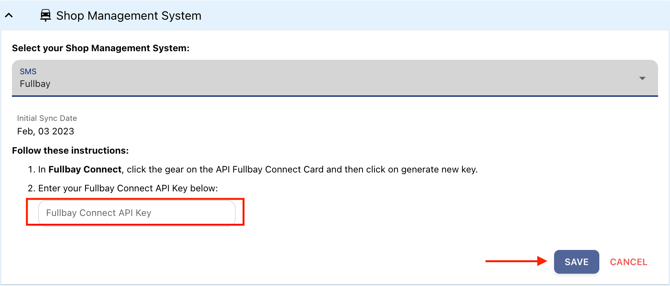
- Under Shop Management System, choose FullBay from the dropdown menu.
For MSOs (Multi-Shop Operators) or When Adding a New Location
- Navigate to System Settings.
- Select Locations.
- Click the location you want to integrate.
- Go to the Integrations tab.
- Select FullBay as the Shop Management System.
✅ Step 2: Generate and Enter Your FullBay API Key
- In FullBay Connect, click the gear icon on the API FullBay Connect Card.
- Click Generate New Key.
- Copy your FullBay Connect API Key.
- Paste it into the FullBay Connect API Key field in the integration setup.
- Click Save to complete the connection.
✅ Step 3: Best Practices & Additional Notes
- Ensure the API Key is copied exactly as generated—no extra spaces.
- Only one active API key per location is recommended.
- If you need to adjust integration settings later, you can return to this screen.
- Best uploading practices: A link will be added here once available.
Best Practices
- Store your API key securely and avoid sharing it with unauthorized users.
- If connection issues occur, generate a new API key in FullBay and update it in WickedFile.
- Only one active API key should be in use at a time to prevent conflicts.
- For users managing multiple locations, ensure each location is mapped correctly in WickedFile after integration.
Troubleshooting
|
Issue |
Solution |
|
API key not working |
Regenerate the key in FullBay and re-enter it in WickedFile. |
|
Unable to save the integration |
Ensure the API key was pasted correctly without extra spaces. |
|
No data syncing |
Confirm that API permissions are active in FullBay and integration is saved in WickedFile. |
Security Notes
- API connections are encrypted to ensure secure data transfer.
- WickedFile does not store FullBay login credentials—only the encrypted API key is used.
- Access can be revoked at any time by generating a new key in FullBay.
Need Help?
For help configuring or troubleshooting the FullBay integration, contact WickedFile Support or your system administrator.