
📍 Step 1: Navigate to Integration Settings in WickedFile
For Single Locations
- Go to System Settings.
- Click Integrations.
- Under Shop Management System, select Tekmetric.
For MSOs or When Adding a New Location
- Navigate to System Settings > Locations.
- Select the location you want to integrate.
- Click the Integrations tab.
- From the dropdown under Shop Management System, select Tekmetric.
🔑 Step 2: Complete Setup in Tekmetric
Follow the instructions shown on screen or use the steps below:
- In Tekmetric, click Shop Settings in the left-hand navigation bar.
- Click the Integrations tab at the top of the page.
- Locate the WickedFile integration near the bottom of the page.
- Click Manage, then allow access to connect Tekmetric to WickedFile.
- Return to the top of the page and click the Shop Profile tab.
- Under the Your Shop section, locate your Tekmetric URL.
- Copy the number that appears at the end of the URL after the final slash (/).
- Example URL: shop.tekmetric.com/admin/shop/12345
- Copy the number that appears at the end of the URL after the final slash (/).
In this example, 12345 is your Tekmetric Shop Number.

📝 Step 3: Enter Your Tekmetric Shop Number in WickedFile
1. Paste the Tekmetric Shop Number into the field labeled Tekmetric Shop Number in WickedFile.
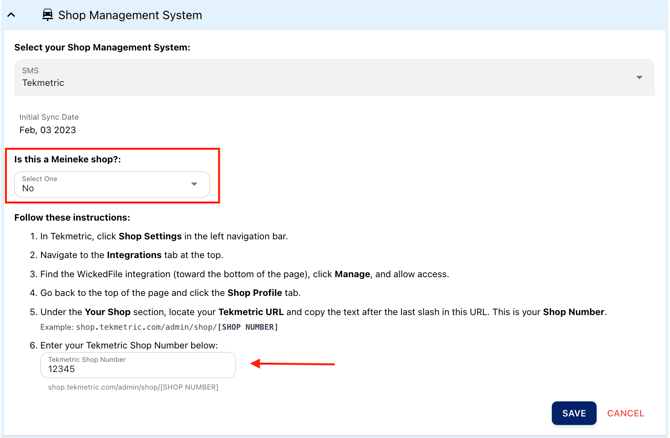
2. Click Save to the integration.
✅ Once Connected
- WickedFile will begin syncing data from Tekmetric for this location.
- Repeat the same steps for additional locations if needed.
📌 Notes & Best Practices
- Make sure Tekmetric access is granted when enabling the WickedFile integration.
- Each location must use its own unique Tekmetric Shop Number.
- If your shop is part of Meineke or a franchise network, be sure to answer the “Is this a Meineke shop?” question accordingly during setup.
- If you need best practices for importing data and documents, follow the guide here:
[Insert Best Uploading Practices Link Here]
❓ Need Assistance?
If you run into any issues, our support team is happy to help with setup or troubleshooting.