
📊 Understanding the Billing Table
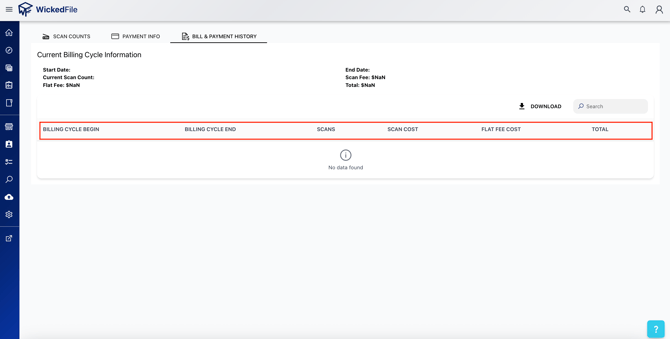
The billing table summarizes all completed and ongoing billing cycles. Each row represents one billing period.
Key Fields:
- Billing Cycle Begin / End – Start and end dates for the billing period.
- Scans – The total number of scans performed during that cycle.
- Scan Cost – Any additional cost per scan (if applicable).
- Flat Fee Cost – The standard monthly subscription fee.
- Total – The total amount billed for that cycle.
🧾 Current Billing Cycle Summary
At the top of the page, you’ll see an overview of your current billing cycle, including:
- Start Date and End Date
- Current Scan Count
- Flat Fee, Scan Fee, and Total amounts
⚙️ Available Actions
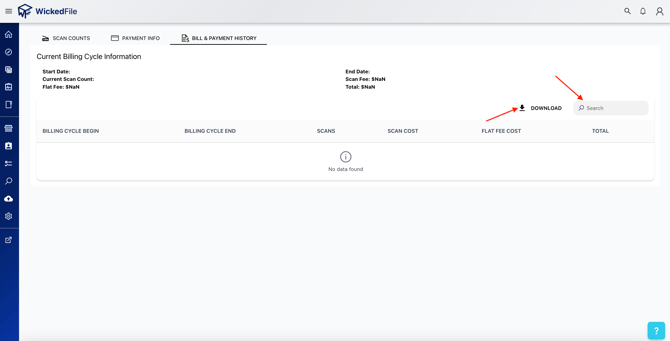
- ⬇️ Download – Export your billing history for accounting or auditing.
- 🔍 Search – Quickly find specific billing cycles or invoices.
- 🧾 Client Invoices – View or download invoice documents directly from the dashboard.
💡 Tip: If you see $NaN or blank values in a column, the billing cycle may still be in progress or data hasn’t been finalized yet.
🧠 FAQs
Q: Why does my total show $NaN?
A: This usually means billing for that cycle isn’t finalized or no scans were recorded.
Q: Can I download my billing history?
A: Yes. Click Download in the top-right corner to export your billing data.
A: Use the Search bar to find the billing cycle by date, then review the flat fee and scan totals.