Making a Vendor a Statement Vendor
A statement vendor is a vendor from whom you regularly receive statements. These statements summarize the transactions or invoices for a given period. Marking a vendor as a statement vendor allows you to track and reconcile their statements within the system — ensuring proper documentation exists to support the activity reflected on the vendor’s statements.
✅ Why Mark a Vendor as a Statement Vendor?
Designating vendors as statement vendors is important for:
🔍 Reconciliation & Documentation Tracking
When a vendor is marked as a statement vendor, your system will expect and track regular statements from them. For each statement, the system checks how much of the dollar amount shown on the statement is backed by documentation (invoices and credit memos).
This helps you:
- Ensure you’ve received necessary supporting documents
- Identify any missing or incomplete records
- Maintain organized, accurate records for all vendor activity
For example, if a vendor statement totals $283 but only $94 worth of documents are on file, the system will show an Accounted For percentage of 33%.
📥 How to Make a Vendor a Statement Vendor
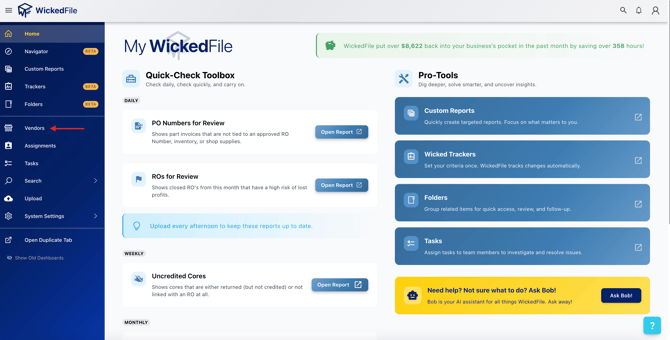
- 1. Go to the Vendor Tab
Use the navigation menu on the left-hand side and select Vendors.
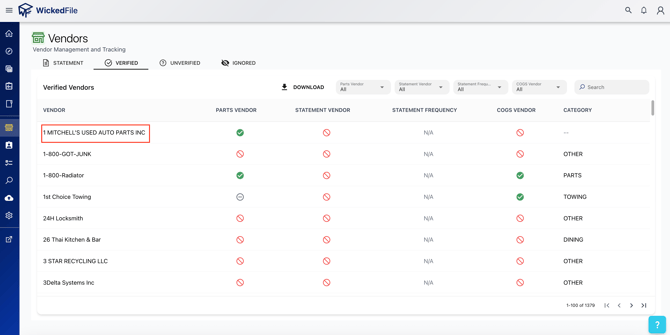
- 2. Open the Vendor’s Profile
Find and click on the vendor you wish to edit.
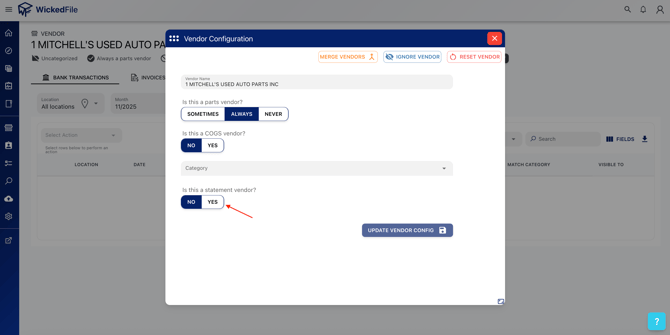
- 3. Select Edit Configuration
Turn on the toggle or checkbox labeled “Statement Vendor”.
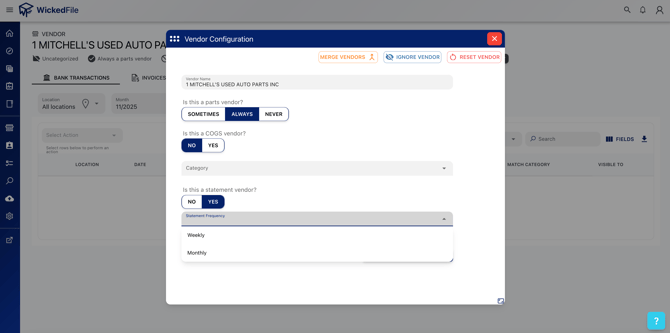
- 4. Set Statement Frequency
Choose how often you receive statements from the vendor (monthly or weekly).
- 5. Update Vendor Configuration
The vendor will now appear in your Statement Vendors view.
📊 Where to Track Statement Reconciliation
To view and manage your statement vendors:
Go to the Vendors tab → Select Statement Vendors


From here, you can:
- View vendors marked as statement vendors
- See the Accounted For % for each
- Check the latest statement date received for the selected month
- Open detailed statement views per vendor
🔍 Key Terms
|
Term |
Definition |
|
Accounted For % |
The percentage of a statement total that is supported by documentation (invoices and credit memos) already in the system. |
|
Statement Total |
The full dollar amount from the vendor’s statement, calculated using the absolute value of transactions listed. |
|
Unaccounted For $ |
The portion of the statement amount with no documentation on file. |
⚠️ Why It Matters
Marking vendors as statement vendors helps your team:
- Proactively identify missing documents
- Keep vendor records accurate and up-to-date
- Save time during reviews or audits by having reconciled statements clearly tracked
🙋 Need Help?
If you're not sure whether a vendor should be marked as a statement vendor or you need help setting this up, Ask Bob or Contact Support.