
✅ Why Mark a Vendor as a Statement Vendor?
Designating vendors as statement vendors is important for:
🔍 Statement Recognition and Reconciliation
When a vendor is marked as a statement vendor, your system will expect and track regular statements from them. For each statement, the system checks how much of the dollar amount shown on the statement is backed by documentation (invoices and credit memos), and a final validation view of the associated part statuses (codes).
This helps you:
- Identify any missing invoices so that you can get these uploaded and have part visibility.
- Have a final, high-level view of part validation by looking at the associated part statuses.
📥 How to Make a Vendor a Statement Vendor
- 1. Go to the Vendor Tab
Use the navigation menu on the left-hand side and select Vendors.
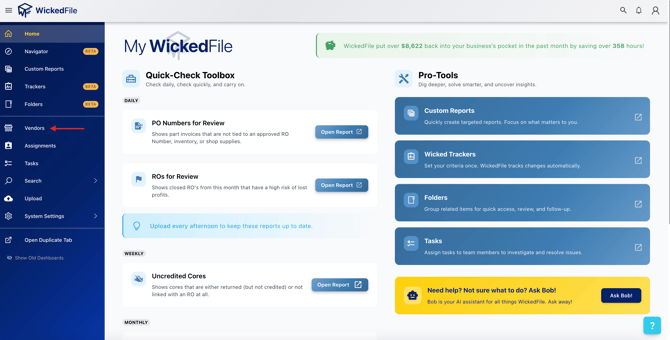
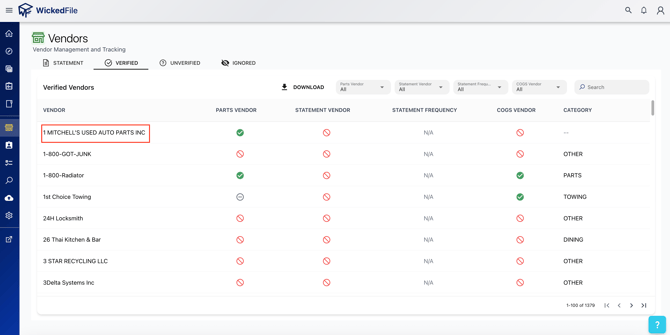
- 2. Open the Vendor’s Profile
Find and click on the vendor you wish to edit.
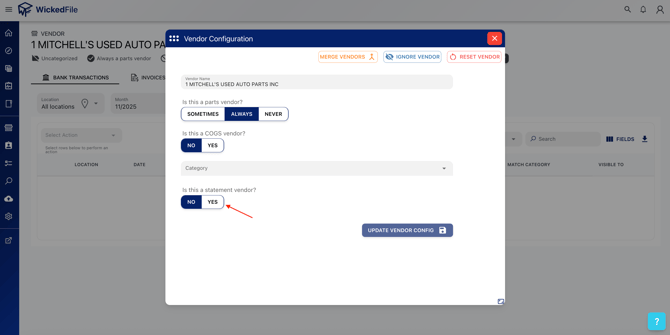
- 3. Select Edit Configuration
Turn on the toggle or checkbox labeled “Statement Vendor”.
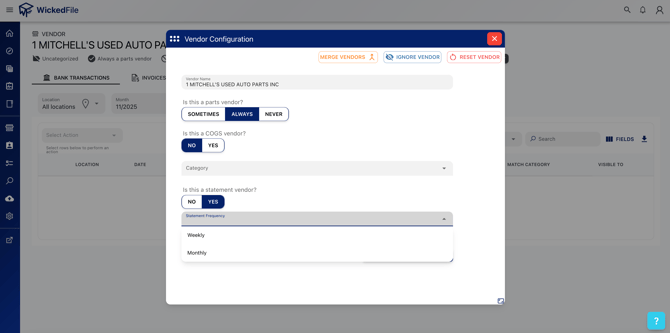
- 4. Set Statement Frequency
Choose how often you receive statements from the vendor (monthly or weekly).
- 5. Update Vendor Configuration
The vendor will now appear in your Statement Vendors view.