
📍 Step 1: Navigate to Integration Settings in WickedFile
Depending on your account setup, follow the appropriate path below:
For Single-Location Accounts
- Go to System Settings.
- Click Integrations.
- Under Shop Management System, select Protractor.
For MSOs or Adding a New Location
- Go to System Settings.
- Click Locations.
- Select the location you want to integrate.
- Choose the Integrations tab.
- Set Shop Management System to Protractor.
📨 Step 2: Request Integration Credentials from Protractor Support
- Open a chat with Protractor Support or email their support team.
- Request the following three items for your WickedFile integration:
- Connection ID
- API Key
- Authentication Token
- Connection ID
- Support will generate and provide these credentials securely.
✅ Tip: For faster service, tell them you are integrating Protractor with WickedFile and need Connection ID, API Key, and Authentication.
🖥 Step 3: Enter Credentials in WickedFile
Once you receive the credentials:
- Enter the values provided by Protractor Support into the fields:
- Connection ID
- API Key
- Authentication
- Connection ID
- Click Save.
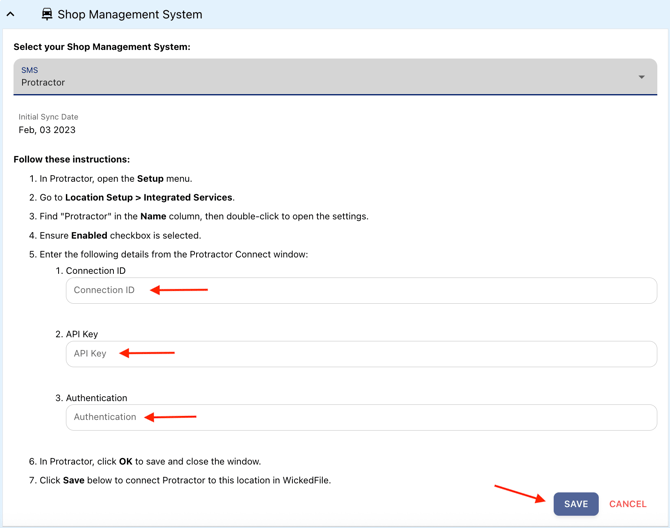
Your location is now connected to Protractor.
✅ After Setup
Once integrated:
- Repair orders and shop data will automatically sync to WickedFile.
- You can update or remove the connection at any time by returning to System Settings > Integrations.
📌 Notes & Best Practices
- Only authorized users can request credentials from Protractor Support.
- Keep these credentials secure—treat them like passwords.
- If you update Protractor credentials in the future, you must also update them in WickedFile.
❓ Need Assistance?
If you need help completing the setup, contact WickedFile Support—we’re happy to assist.