
Note - While Ready-Made Reports are active in WickedFile, it is highly recommended for all users to utilize the AP Hub as their one-stop workflow. Please read more about using the AP Hub.
Reports are organized by recommended review frequency to support structured workflows:
- Daily
- Weekly
- Monthly
- Quarterly
- No Frequency Set (On-Demand)
Using and Customizing Reports
Accessing Ready-Made Reports
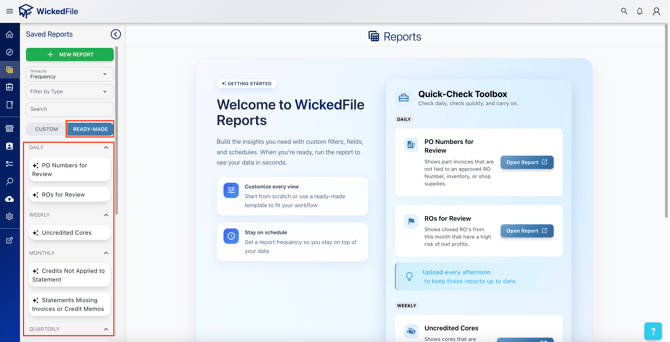
- Go to the Custom Reports tab in WickedFile.
- Select the frequency category (Daily, Weekly, Monthly, etc.).
- Click on any report to open and view details.
Filtering and Customizing
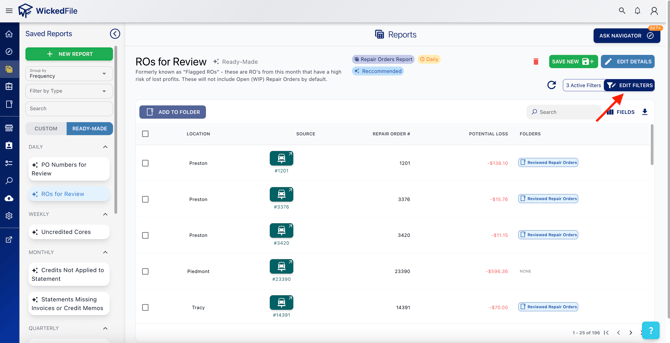
- Each report includes dynamic filters that allow users to adjust date ranges, vendors, RO numbers, part types, status, and more.
- Use filters to narrow results to only what you want to see.
- After adjusting filters, you can overwrite the existing report or save it as your own custom report.
Saving as a Custom Report
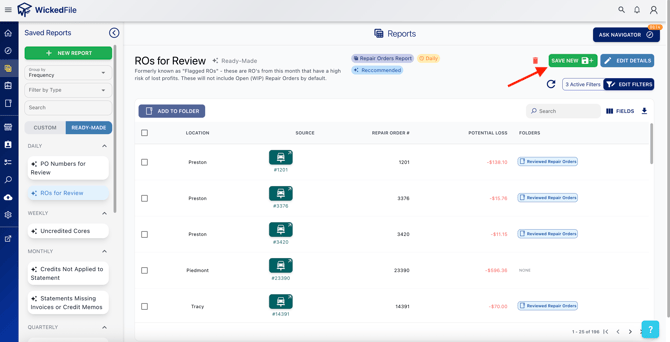
- Open a ready-made report.
- Apply preferred filters or sorting options.
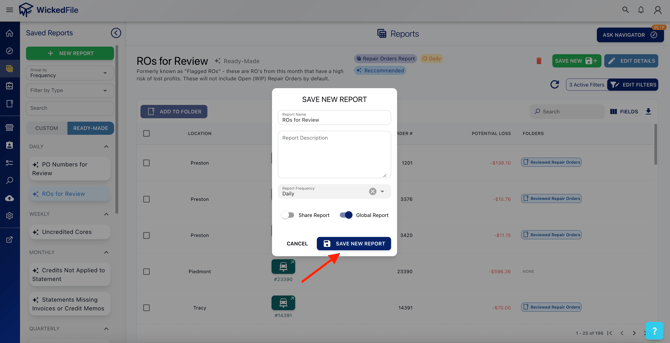
- Select Save or Overwrite Report.
- Rename or store it for future use under My Custom Reports, if desired.
Report Categories and Descriptions
📅 Daily Reports
|
Report Name |
Purpose |
|
PO Numbers for Review |
Purchase orders that require approval or correction. |
|
ROs for Review |
Repair orders needing documentation, charges, or review. |
📆 Weekly Reports
|
Report Name |
Purpose |
|
Uncredited Cores |
Cores returned to vendors without corresponding credit received. |
📅 Monthly Reports
|
Report Name |
Purpose |
|
Credits Not Applied to Statement |
Vendor credits that exist but haven't been applied to statements. |
|
Statements Missing Invoices or Credit Memos |
Vendor statements missing expected invoices or credits. |
📊 Quarterly Reports
|
Report Name |
Purpose |
|
Deleted ROs |
Repair orders deleted from the system for audit review. |
|
ROs Open 30+ Days |
Repair orders still open after 30 days. |
|
ROs w/o Hazmat and/or Shop Supply Fees |
ROs missing standard hazmat or shop supply charges. |
⚙️ No Frequency Set (On-Demand Reports)
|
Report Name |
Purpose |
|
Document Review |
Documents awaiting approval or attachment. |
|
Fees Incurred |
Summary of recorded fees for auditing. |
|
Inventory In |
Items received into inventory awaiting reconciliation. |
|
Inventory Out |
Inventory removed, issued, or sold without full documentation. |
|
PO Numbers for Review (Credit Memos) |
Purchase orders tied to credit memos needing review. |
|
Parts Not Sold or Credited |
Parts in inventory that haven’t been sold or credited. |
|
Risky Transactions to Spot Check |
Unusual or high-risk transactions flagged for review. |
|
Shipping Incurred |
Shipping charges entered but not yet verified or matched. |
|
Shop Supplies |
Review of shop supply charges for consistency. |
|
Tax Incurred |
Taxes applied to ROs or invoices for auditing and compliance. |
Best Practices
- Use filters to tailor the report to your current workflow or audit needs.
- Save commonly used filters and settings as your own custom reports.
- Review Daily and Weekly reports for fast issue detection.
- Use Monthly and Quarterly reports for reconciliations and vendor management.
- Regularly export and archive reports for compliance and internal documentation.
Need Help?
If you need support customizing or saving reports, contact your account administrator or WickedFile Support.