
The AP Hub is the primary workspace inside WickedFile where Accounts Payable work is enhanced with AI automation. It’s designed to mirror how real auto repair shops process AP—but without the chaos, rework, and month-end panic.
Instead of waiting on vendor statements and scrambling to reconcile everything in a 10-day window, the AP Hub introduces an invoice-first AP workflow. This allows back-office teams to work invoices continuously throughout the month, so statements are easy to close and payment decisions are confident, controlled, and audit-ready.
At a high level, the AP Hub helps you:
-
Know the status of every invoice before you pay the vendor
-
Focus only on exceptions, not auto-coded invoices
-
Maintain a single system of record for AP activity across vendors, locations, and time
Who the AP Hub Is For
The AP Hub is built primarily for back-office users, including:
-
Bookkeepers
-
AP managers
-
Controllers
-
Owners and operators who oversee financial discipline
Generally, shop-level staff (service advisors, managers) should only interact with the AP Hub when responding to tasks or searching for documents. This separation preserves accountability and keeps them focused on their operational duties.
Invoice-First Workflow (Why This Matters)
Traditional AP workflows in auto repair rely on statements. That creates:
-
Delayed visibility
-
Compressed payment timelines
-
Missed credits and invoices
-
Rushed decisions
WickedFile flips this model.
In the AP Hub, every uploaded invoice is automatically analyzed, coded, and placed into a working state as soon as it’s processed. You work invoices daily, not statements monthly. Statements then become a confirmation step—not a discovery process .
Automatic Invoice Coding
Each invoice is automatically coded by WickedFile’s AI into a clear status so you can focus on what matters.
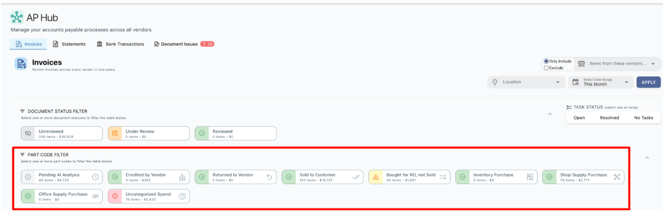
Invoice Coding States 🟢🔴🟡⚪️
Green 🟢
-
Sold to Customer
-
Credited by Vendor
-
Inventory Purchase
-
Shop Supply Purchase
-
Office Supply Purchase
Yellow 🟡
-
Bought for RO but Not Sold
Red 🔴
-
Uncategorized Spend
Grey ⚪️
-
Pending AI Analysis
Your job in the AP Hub is simple:
Review and recode yellow and red invoices until everything is confidently accounted for.
Coding an invoice is the final state—not matching perfection. The goal is knowing where the money went before paying the vendor.
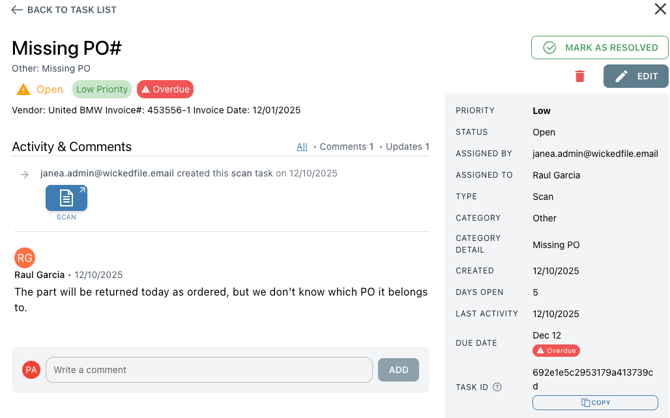
Tasks: How The Back Office Can Get Answers Without Chasing The Front Office
When something needs clarification from someone in the shop, back office members can simply:
-
Assign a Task directly from the invoice
-
Route it to a service advisor, manager, or another user
-
Keep the conversation attached to the document
Only Admins can close tasks, ensuring resolution—not just responses.
Why the AP Hub Matters
The AP Hub isn’t just a screen—it’s the backbone of WickedFile's purpose:
A single workspace where every invoice is processed, reconciled, and coded so that you finally can close statements without the headaches.
-
Eliminates profit leaks
-
Reduces AP labor
-
Enforces financial discipline
-
Scales cleanly from 1 location to 100+